
BrightPay Cloud Employee Portal
The BrightPay Cloud Client Portal allows you to securely access payroll information shared with you by PayrollAbility. The portal gives you convenient access to payroll reports, employee information and important documents in one secure location.
BrightPay Cloud Employee Portal: Introduction
The BrightPay Cloud Employee Portal allows you to securely access your payroll information online. The portal provides convenient access to your payslips, payroll documents and personal payroll details in one secure location.
You can access the portal from any device using your login details provided in your invitation email.
Through the portal you can:
• View and download your payslips.
• Access payroll documents such as P60s.
• Update certain personal details (where enabled).
• Submit holiday requests (optional feature).
• View the status of holiday requests and other submissions.
Secure access to your payroll information
Your payroll information is stored securely within the BrightPay Cloud portal. Access to the portal is protected by your personal login details, ensuring that only you can view your payslips and payroll documents.
If you ever receive an email inviting you to access the portal and are unsure whether it is genuine, you can contact PayrollAbility for confirmation before logging in.
Portal Navigation Overview
The BrightPay Cloud Employee Portal is organised into four main sections.
Each section contains action buttons that allow you to access different areas of your payroll information.
Dashboard
• Quick access to frequently used information.
Documents
• View payslips and payroll documents.
Calendar (optional feature)
• View annual leave and request holiday.
• View and update personal details.
Getting Started
Invitation Email
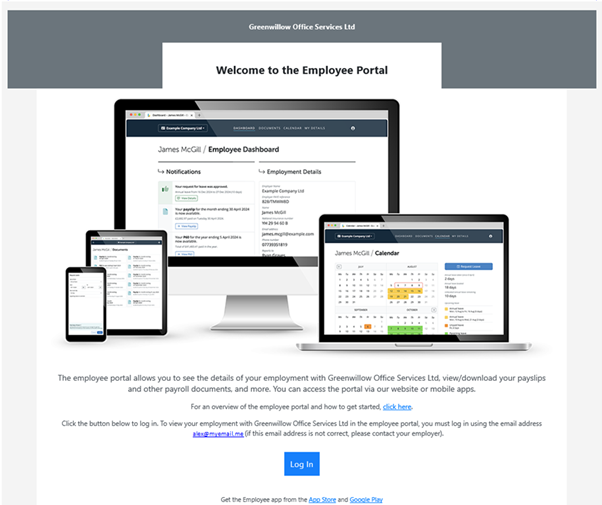
You will receive an invitation email from:
BrightPay
Subject: Welcome to the Client Portal
Click the Log In button in the email to activate your account and confirm your access. The log-in button will take you to https://employee.brightpay.com/
Once logged in, you will see the Cloud Employee Dashboard.
Portal Overview
Dashboard
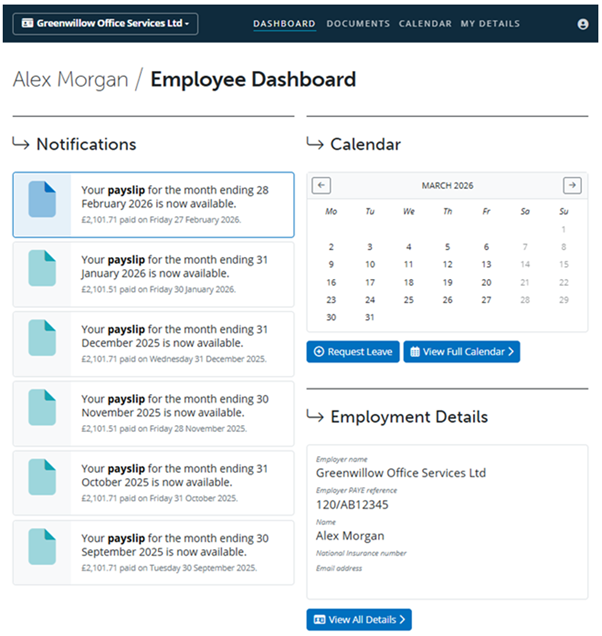
The Dashboard provides quick access to payslips and employer details.
The holiday management and calendar features will only be available if your employer manages holiday through the Cloud Employee Portal.
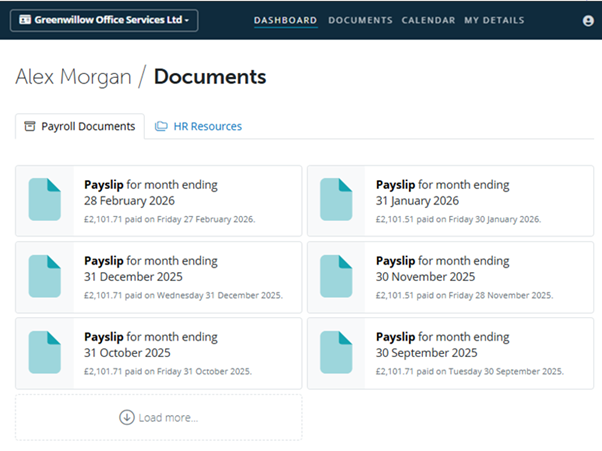
The Documents section contains payslips, P60s and pension letters. They can be viewed, downloaded or printed.
If your employer shares HR documents with you, they can be found in the HR Resources tab.
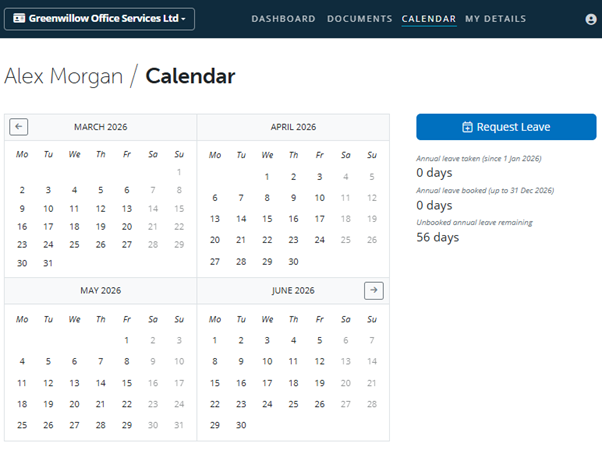
Annual leave entitlement details are shown in the Calendar section along with the number of days already taken and booked. Leave can be requested which will send a request to your employer. Requests are shown below the calendar, along with whether the request has been approved or declined.
The calendar will also show any other leave, such as sickness absence or parental leave.
This feature will only be available if enabled by your employer and PayrollAbility.
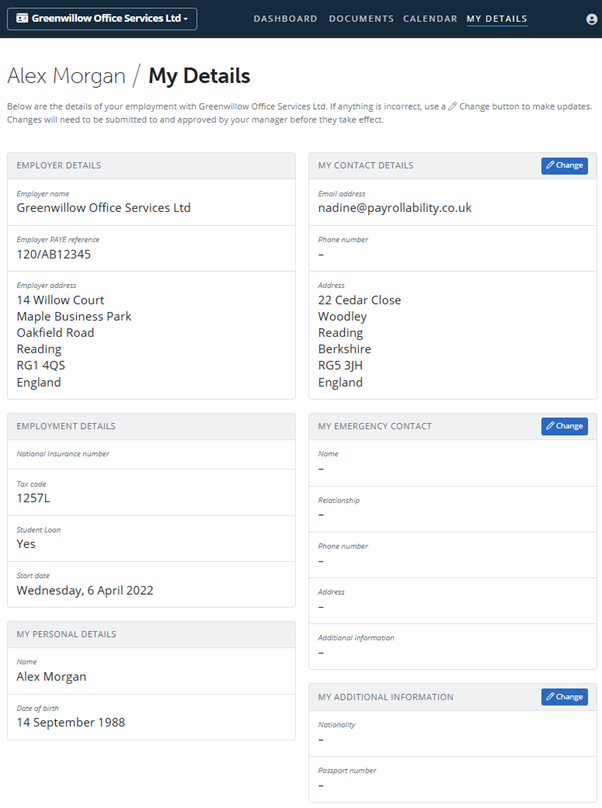
Employer and employee details can be viewed in this section.
Employees can update some personal details such as home address. The changes will be submitted to your employer and approved or declined. You will receive notification once actioned (optional feature)
This feature will only be available if enabled by your employer and Payrollability.
Need Help?
If you have any questions about accessing the portal or locating information, please contact:
How-to Guides
View Payslip
- Log into your Cloud Employee Portal
- Your six most recent payslips will be shown on the Dashboard
- Older payslips can be found by selecting Documents
- Click Load More to view earlier payslips, P60s or pension letters
Requesting Holiday
This feature will only be available if your employer manages holiday through the Cloud Portal.
- Log into your Cloud Employee Portal
- Click Calendar
- Click Request Leave
- Select the dates using the From and To dropdown menus
- Add a supporting comment if required
- Click Submit
Your holiday request must be approved by your manager before your calendar and holiday entitlement are updated.

Changing Home Address
This feature will only be available if enabled by your employer and PayrollAbility.
- Log into your Cloud Employee Portal
- Click My Details
- Click Change
- Update your details and click OK
Your changes will need to be approved by your employer before they take effect.
To request a change to your email address, please contact your employer directly. Note that if your email address is changed, you may need to set up new login credentials using the updated email address to access this portal.
If you are looking for payroll services for carers, why not outsource it with PayrollAbility. Get in touch with our team today to discuss how we can help your business will all things payroll, tax and pensions.
Call us today on 01273 56 92 27, or complete our contact form and our team will be in touch with you as quickly as possible.
You can find out more about our process on our contact page, or read more about how our services can help you online.
We look forward to hearing from you!
Follow Us on Social Media
Providing Payroll Outsourcing Services across the UK, including Birmingham, London, Shrewsbury, Reading, Cambridge, Oxford, Norwich, Stafford, Nottingham, Manchester, Brighton, Crawley, Portsmouth, Worthing, Eastbourne, Hastings, Chichester, Lancaster, Durham, Carlisle, York & more.
Contact PayrollAbility
Frequently Asked Questions About Our Payroll Services
What are the costs of our payroll services?
Our Fixed Fee, payroll service for small businesses starts at £34.11 per month which includes pension processing*.
Do you handle pension auto-enrolment?
Yes. Our payroll services cover the setup and management of pension auto-enrolment as needed, ensuring all contributions and compliance remain accurate at all times.
Are your payroll services up to date with HMRC Compliance?
Yes. We always make sure that our services stay fully HMRC compliant, meaning your business stays fully compliant too.
Do you work with business of all sizes across the UK?
Yes, we work with small businesses, new startups, and larger firms across the UK.
Follow us on social media